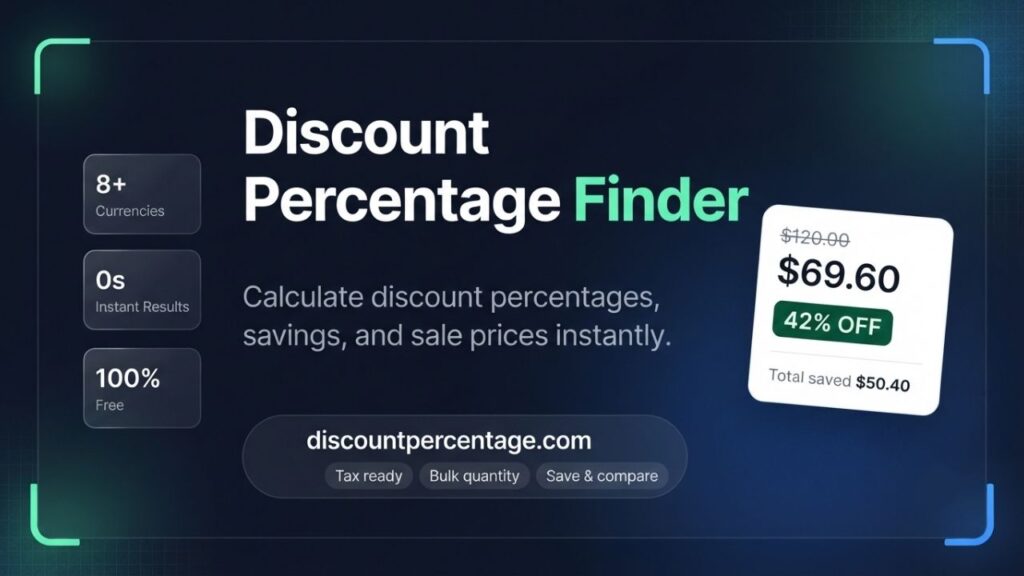
I built the Discount Percentage Finder, a free online calculator that instantly shows your exact discount percentage, money saved, and final sale price with tax and multi-currency support.
Discount Percentage Finder
Find exact discount percentages, money saved, and price differences instantly
Calculator Inputs
Calculation Results
Saved Comparisons
No comparisons saved. Enter and save calculations to organize complex deals.
| Label | Original Total | Sale Total | Discount % | Money Saved | Action |
|---|
Table of Contents
Discount Percentage Finder
I still remember standing in a shoe store years ago, phone in hand, trying to figure out whether a “40% off” sticker on top of an already-reduced price was actually a good deal or just clever marketing. I did the math on a calculator app, got it wrong the first time, and walked away more confused than when I started.
That small, everyday frustration is the exact reason I designed and built the Discount Percentage Finder a free, browser-based calculator that tells you, in seconds, exactly how much a discount is worth, how much money you’re really saving, and what your final price will be after tax.
I’m a lecturer and certified web developer with more than ten years of teaching and software development experience, and I’ve spent a good part of that career explaining numbers to people in a way that actually makes sense to them.
This tool is an extension of that same goal: strip away the confusion around percentages and pricing, and give people a clean, accurate, instant answer they can trust.
In this article, I’ll walk you through exactly what the Discount Percentage Finder does, how every feature works, why I built it the way I did, and how you can use it to shop smarter, price your products more confidently, or teach percentage calculations to students all without opening a spreadsheet or doing mental math under pressure.
What Is the Discount Percentage Finder?
The Discount Percentage Finder is a free online calculator hosted on Science Addicted Tools that instantly calculates the discount percentage between an original price and a sale price. Instead of just handing you one number, I designed it to give you a complete picture of a deal: the percentage off, the total amount of money saved, the original and final totals across multiple items, and even the sales tax applied on top of your purchase.
Unlike a lot of the bare-bones discount calculators scattered around the web, I built this one to handle real shopping and business scenarios buying more than one unit of an item, comparing deals in different currencies, applying local sales tax, and saving multiple calculations side by side so you can compare which deal is genuinely the best one.
You don’t need to sign up, download anything, or install a browser extension. You open the page, enter your numbers, and the result updates instantly.
Why I Built This Tool
As someone who has taught mathematics-adjacent concepts for over a decade, I noticed the same pattern over and over: people understand the concept of a percentage discount but struggle the moment real-world variables get added tax, quantity, different currencies, or comparing two separate deals at once.
Most calculators online only solve the simplest version of the problem: one price minus another price, converted to a percentage. That’s fine for a single item with no tax, but it doesn’t reflect how people actually shop or run a business.
So I set out to build something more complete a calculator that a student could use to understand the math behind a discount, that a shopper could use to check if a “sale” is actually worth it, and that a small business owner could use to work out margins and markups without opening Excel.
That’s the philosophy behind every feature in the Discount Percentage Finder.
Core Features of the Discount Percentage Finder
Here’s a detailed breakdown of what you’ll find inside the tool and how each part works.
1. Original Price and Sale Price Inputs
At the heart of the tool are two simple fields: Original Price (per item) and Sale Price (per item). You type in what the item cost before the discount and what it costs now, and the calculator does the rest. I built in real-time validation, so if you enter a price of zero or leave a field blank, the tool will let you know immediately instead of showing you a broken or misleading result.
2. Multi-Currency Support
Because I know my audience isn’t just shopping in US dollars, I added a currency selector that supports USD (),EUR(€),GBP(£),INR(₹),PKR(₨),CAD(C), EUR (€), GBP (£), INR (₹), PKR (₨), CAD (C ),EUR(€),GBP(£),INR(₹),PKR(₨),CAD(C), AUD (A$), and JPY (¥). Whether you’re comparing a discount in Rawalpindi, London, or New York, the tool displays your results in the correct currency symbol so the numbers make immediate sense to you.
3. Quantity Field for Bulk Purchases
Buying more than one of the same item? The Quantity field lets you calculate the discount and total savings across multiple units at once, rather than forcing you to multiply everything by hand afterward. This is especially useful if you’re stocking up during a sale or purchasing supplies in bulk for a classroom, office, or small business.
4. Quick Sale Ratio Adjustment
One of my favorite additions is the Quick Sale Ratio adjustment a row of preset buttons (100%, 90%, 75%, 50%, 30%, and 10% of the original price) that instantly recalculates your sale price based on common discount tiers.
If you just want to see what a 50% off sale would look like on an item, you don’t have to do the math yourself just click the button and watch the results update.
5. Markup Mode
The Discount Percentage Finder isn’t only for shoppers. I built in a Markup Mode specifically for sellers, retailers, and small business owners who need to work in the opposite direction figuring out how much to mark up a cost price to reach a target sale price.
This makes the tool genuinely dual-purpose: useful whether you’re trying to save money or trying to price a product correctly.
6. Sales Tax Calculation
Real purchases usually involve tax, and I didn’t want this tool to ignore that. Under Advanced Tax & Customization, you can enter your local Sales Tax (%), and the calculator will show you the exact tax amount included in your final total so the number you see is the number you’ll actually pay at checkout, not a rough estimate.
7. Item or Store Label
If you’re comparing deals from different stores or tracking multiple items, the optional Item / Store Label field lets you name each calculation so you can tell them apart later, especially when you start saving multiple comparisons.
8. Instant, Detailed Results Panel
Once you’ve entered your numbers, the Calculation Results panel updates instantly and shows you:
- The Discount Percentage (the exact percent off)
- Total Saved (how much money you’re keeping in your pocket)
- Total Original Price and Total Sale Price (factoring in quantity)
- Tax Amount Included in your final total
There’s no “Calculate” button to hunt for and no page reload everything is live.
9. Value Analyzer
The built-in Value Analyzer goes a step further than most discount tools by giving you a sense of deal-tier value optimization essentially helping you gauge whether the discount you’re looking at is a genuinely strong deal or a modest one, based on the numbers you’ve entered.
10. Saved Comparisons Table
This is the feature I’m most proud of. Instead of calculating one discount and losing that information the moment you check another item, you can Save Deal and build a running table of comparisons, complete with the label, original total, sale total, discount percentage, and money saved for each entry. From there, you can:
- Export CSV to keep a record or open it in a spreadsheet
- Print Report for a physical copy
- Clear All to start fresh
This turns the Discount Percentage Finder from a one-off calculator into a lightweight deal-comparison workspace genuinely useful if you’re deciding between several sale items or auditing pricing across multiple products.
11. Copy Calculation Overview
If you just need to quickly share a result with someone a friend, a colleague, a customer the Copy calculation overview button copies a clean summary of your calculation to your clipboard in one click.
How to Use the Discount Percentage Finder (Step-by-Step)
I designed the interface to be usable by anyone, regardless of technical background. Here’s exactly how to use it:
- Select your currency from the dropdown at the top so all figures display correctly.
- Enter the Original Price of the item (per unit).
- Enter the Sale Price of the item, or use the Quick Sale Ratio buttons (90%, 75%, 50%, 30%, 10%) to auto-fill a common discount tier.
- Set the Quantity if you’re buying more than one unit.
- If you’re a seller working the calculation in reverse, toggle Markup Mode to calculate a sale price from a cost price.
- Enter your Sales Tax percentage, if applicable, under Advanced Tax & Customization.
- Optionally, add a Label so you can identify this specific item or store later.
- Read your results instantly in the Calculation Results panel discount percentage, total saved, totals, and tax included.
- Click Save Deal if you want to keep this calculation for comparison against others.
- Repeat for as many items as you like, then use Export CSV or Print Report to keep a record, or Clear All to start over.
No formulas, no spreadsheets, no second-guessing just clear numbers you can act on.
Advantages of Using the Discount Percentage Finder
- Accuracy you can trust. Every calculation is handled by the same logic every time, removing the human error that creeps in with manual math.
- Completely free, with no sign-up required. I built this as a tool for everyone, not a lead-generation funnel.
- Works for shoppers and sellers alike, thanks to the dual discount/markup modes.
- Handles real-world purchases, including tax and bulk quantities, not just a bare percentage.
- Multi-currency support makes it useful no matter where you’re shopping from.
- Comparison-friendly. The saved comparisons table means you’re not just calculating one deal you’re evaluating several at once, which is how most people actually shop.
- Instant results. There’s no lag between entering your numbers and seeing your answer, so you can check a deal while you’re standing in the aisle.
- Exportable records. The CSV export and print options make it genuinely useful for budgeting, bookkeeping, or classroom handouts.
- Mobile-friendly interface, so it works whether you’re on a laptop at home or your phone in the store.
Who This Tool Is For
- Everyday shoppers who want to know if a sale is actually worth it before they buy.
- Small business owners and retailers who need to quickly calculate markups or discount pricing for products.
- Students and teachers learning or teaching percentage calculations in a practical, visual way.
- Bargain hunters and deal comparison shoppers who want to line up multiple offers side by side.
- Freelancers and budget-conscious families tracking exactly how much they’re saving across purchases.
A Note on Accuracy and Trust
As someone with a background in web development and education, I take the accuracy of this tool seriously. The Discount Percentage Finder uses straightforward, transparent percentage-based calculations the same math you’d do by hand, just automated and instant.
I built and tested it myself, and I continue to maintain it as part of the broader collection of calculators on Science Addicted Tools, including the Smart Savings Calculator, Discount Price Calculator, Reverse Discount Calculator, and Double Discount Calculator, all designed with the same principle: give people clear, dependable numbers they can act on immediately.
If you ever notice something that doesn’t look right, I genuinely welcome feedback through the comments section on the tool’s page this is a tool I built for real people to use, and I want it to keep getting better.
Frequently Asked Questions
Is the Discount Percentage Finder free to use?
Yes. It’s completely free, with no account, sign-up, or download required.
Can it calculate discounts with sales tax included?
Yes. Under Advanced Tax & Customization, you can enter your local sales tax percentage, and the tool will show the exact tax amount and final total.
Does it work for bulk or multiple-item purchases?
Yes. The Quantity field lets you calculate totals and savings across multiple units of the same item.
Can I compare more than one deal at a time?
Yes. Use the Save Deal button to add each calculation to the Saved Comparisons table, then export it as a CSV or print it out.
Does it support currencies other than USD?
Yes. You can choose from USD, EUR, GBP, INR, PKR, CAD, AUD, and JPY.
Can sellers use this tool too, not just shoppers?
Yes. Markup Mode lets sellers calculate a sale price from a cost price, making the tool useful for pricing products as well as evaluating discounts.
Try the Discount Percentage Finder
Whether you’re trying to figure out if that “50% off” sign is actually a good deal, working out margins for your small business, or teaching a class how percentages apply in real life, I built the Discount Percentage Finder to give you an honest, instant answer every time. You can try it directly here: Discount Percentage Finder.
I’ll keep improving it based on how people actually use it so if you have feedback or a feature you’d like to see, I’d genuinely love to hear it.